Antiqly / How it works
How it works
How to identify an antique from a photo, step by step
Antiqly turns a few photos into a likely identification, an explanation of any maker's mark and a price range from similar items listed for sale. Here is what happens at each step, shown with real screens from the app.
Step 1
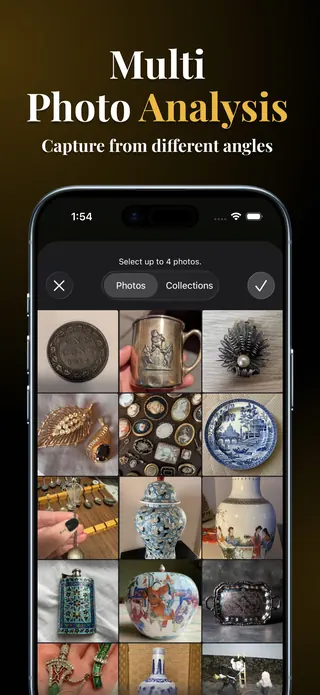
Take a clear photo
Photograph the whole piece with the camera, or pick a photo from your library. Then add up to four more photos and label them: the mark, the base, the back, a detail or any damage. You can also type a short note, such as "blue crossed swords under the base".
- Use daylight or a bright room and avoid flash glare on glaze and silver.
- Fill the frame with the item and keep the background plain.
- If your photos seem to show different objects, Antiqly tells you before it relies on them.
Step 2
Get the identification
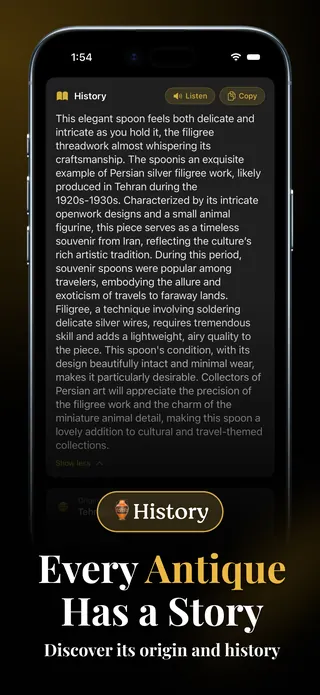
Antiqly suggests what the item most likely is, with its category, period, origin and materials, and how confident it is. A short history explains how and where pieces like yours were made and what collectors look for.
- Condition is scored from Poor to Mint and rarity from Common to Extremely Rare.
- Tap Listen to hear the history read aloud, or Copy to keep the text.
Step 3
Read the maker's mark
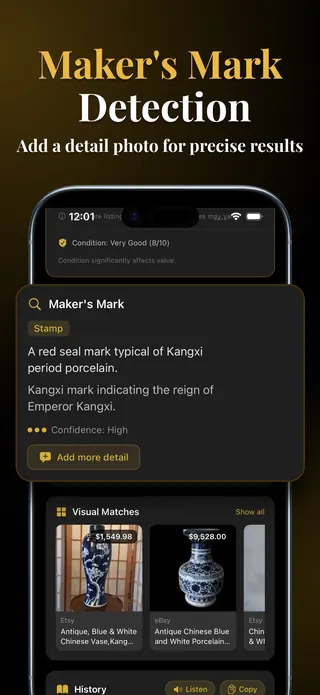
Stamps, hallmarks, backstamps and signatures often decide what a piece is. When Antiqly finds a mark it describes it, explains what it suggests about the maker or the period and shows its confidence.
- No mark visible? Add a close-up of the base or the back and run the analysis again.
- Marks can be copied or worn, so treat a reading as a strong clue, not proof.
Step 4
See a value range from active listings
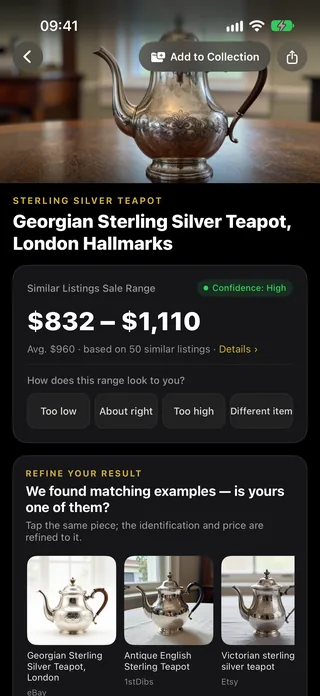
Antiqly searches for similar items currently listed for sale and shows the range, the average and how many listings it is based on. Tap Details to see the listings, and tell the app whether the range looks too low, about right or too high.
- Visual matches: if one of the matching examples is your piece, tap it and the identification and price are refined to it.
- When there are too few listings, the figure is clearly marked as an AI estimate.
- Some categories, such as jewelry, art, Asian works and watches, show a note on what a photo cannot confirm.
Step 5
Save it and keep track
Every result can go into My Collection, which stays on your device.
My Collection
Save pieces with your own notes and see the total estimated value of everything you have saved.
Reports and exports
On iPhone and iPad, create a PDF report of one item, or export your whole collection as a PDF inventory or a CSV spreadsheet.
Share
Send a result to family or a buyer. On iPhone and iPad it is shared as a PDF; on Android as text with a link.
What a photo cannot tell you
Antiqly is useful for a fast first answer: what you have, roughly when and where it was made and what similar pieces are listed for. Some questions need the object in hand:
- Whether a piece is genuine or a later copy, especially when the mark is unclear.
- Gemstones, carats and metal purity in jewelry, or whether a watch runs.
- The exact period of many Asian works and the signature on a painting.
- What an item will actually sell for. Listing prices are asking prices.
Results are not professional appraisals. For valuable pieces, insurance or legal purposes, ask a certified appraiser. More answers in the FAQ.